6 Best AI Presentation Tools in 2026 | Create Research-Backed, Data-Driven Slides
6 Best AI Presentation Tools in 2026
The presentation game has changed. You're no longer stuck spending hours dragging text boxes around slides or hunting for the perfect stock photo. AI presentation tools now handle the heavy lifting—generating content, designing layouts, and even pulling in live data—so you can focus on what actually matters: your message.
I spent weeks testing every major AI presentation tool to see which ones actually deliver. Some generate beautiful slides in seconds. Others integrate seamlessly with your existing workflow. A few do things you didn't even know were possible.
Here are the 6 best AI presentation tools in 2026, ranked by what they do best.
<!-- 技术参数:imageAlt: 6 best AI presentation tools at a glance -->

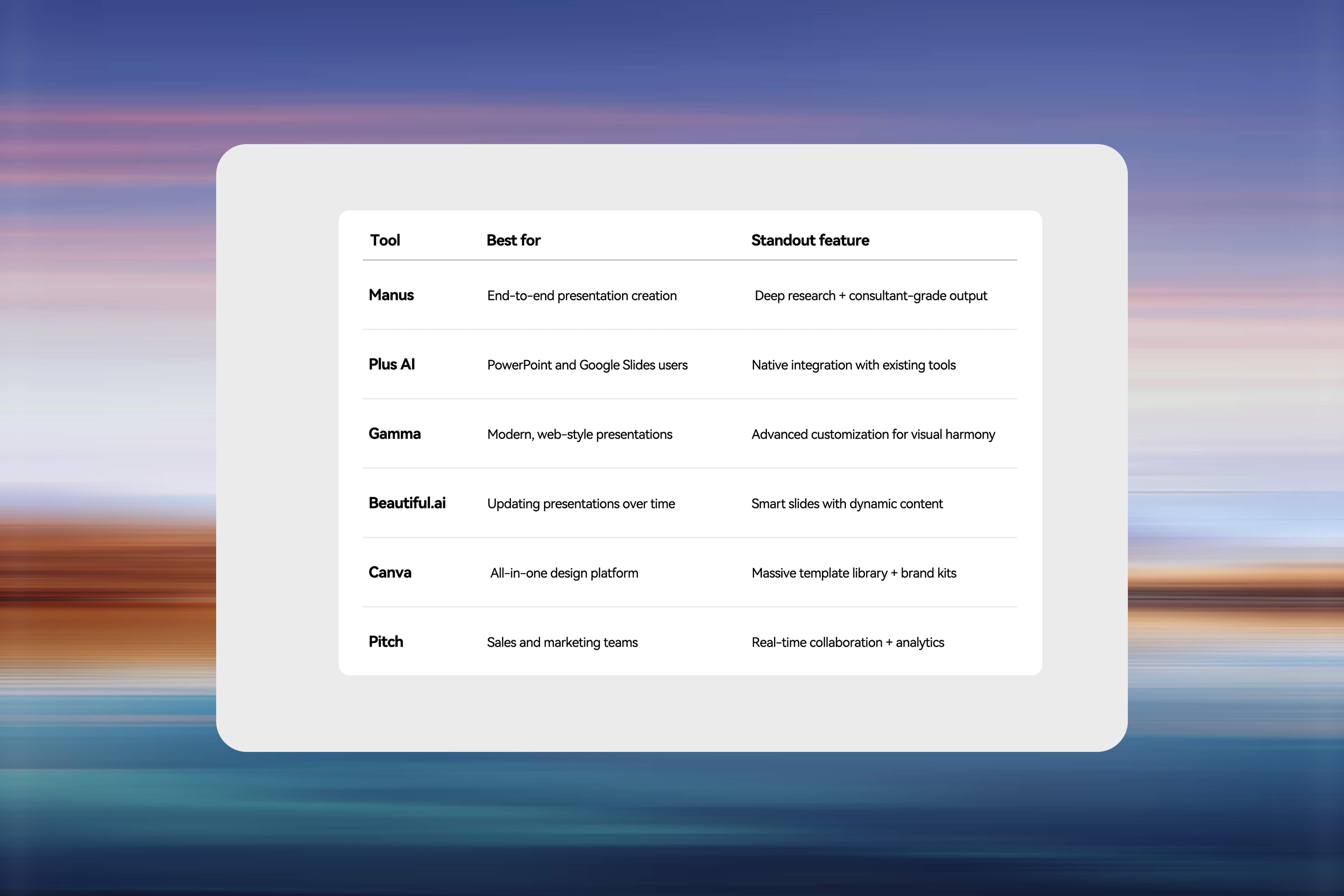
The 6 best AI presentation tools at a glance
Tool | Best for | Standout feature | Pricing |
Manus | End-to-end presentation creation | Deep research + consultant-grade output | Free plan available |
Plus AI | PowerPoint and Google Slides users | Native integration with existing tools | From $10/month |
Gamma | Modern, web-style presentations | Advanced customization for visual harmony | From $8/month |
Beautiful.ai | Updating presentations over time | Smart slides with dynamic content | From $12/month |
Canva | All-in-one design platform | Massive template library + brand kits | Free plan available |
Pitch | Sales and marketing teams | Real-time collaboration + analytics | Free plan available |
What makes a great AI presentation tool?
Before diving into the tools, here's what we looked for:
•Research capabilities: Can the tool research topics and generate presentations from scratch?
•Execution depth: Single-task automation vs. multi-step workflow completion.
•Design quality: Professional layouts matter — your slides should look like they were designed by a creativity-minded professional, not a sci-fi drone.
•Customization: Brand consistency, templates, and style control. Can you easily tweak the generated output to fit your brand and style?
•Integration: Does it play nicely with PowerPoint, Google Slides, and other tools you use?
•Workflow fit: Will this actually help you work, or will it just add yet another app to your cluttered stack?
1. Manus — The AI presentation engine for research, brand consistency, and data visualization
<!-- 技术参数:imageAlt: Manus -->

Manus delivers work results, not just answers.
Unlike chatbots that only provide information, Manus is an AI agent that autonomously plans tasks, uses tools (browser, terminal, file system), and delivers finished work products—including presentations that look like they came from a top consulting firm.
Why Manus stands out
•Research-to-slides. Give Manus a topic, and it doesn't just generate slides—it researches the subject first. It browses the web, reads full articles, cross-references multiple sources, and creates a presentation backed by real data.
•Consultant-grade data visualization and Accurate Analysis. Delivers McKinsey-level visual storytelling, emphasizing accuracy and clarity.
•Multi-file context understanding. Manus reads and synthesizes information across multiple documents—ideal for enterprise-grade reports or cross-departmental projects.
•Wide research. Capable of analyzing 100+ companies or sources in complex topics. Forces citations and runs multi-round analysis.
How it works
<!-- 技术参数:imageAlt: How Manus AI presentation tool works -->

Step 1: PromptAction: The user describes their web app idea using natural language.Agent Function: Manus 1.5 enables full app creation in one prompt with “Less structure, more intelligence.”
Step 2: LaunchAction: Manus handles the build, deploy, and test phases simultaneously.Agent Function: Executes workflows in minutes via parallel tasking.
Step 3: GrowAction: Continuous monitoring and iteration.Agent Function: Manus agents manage long-term performance cycles and optimize strategies.
From research to ready slides: My first market research presentation with Manus
I recently created my first market research presentation using Manus — and the experience was both impressive and effortless.
The resulting deck included:
•A title page with the core value proposition
•A grid layout of key findings
•A deep dive into Manus’s transition from LLM to Agent
•Technological advantages (e.g., sandbox architecture, Wide Research)
•A market overview and competitive comparison (Manus vs. Flowith, OpenAI, Anthropic, etc.)
•Conclusions and recommendations
Design-wise, Manus impressed me with its data-driven layouts, structured grids, and high-contrast visualizations using a color palette of deep navy, corporate blue, and coral.It truly highlighted how Manus is more than a tool—it’s an AI agent that delivers complete, ready-to-use work products.
2. Plus AI — Best for PowerPoint and Google Slides users
<!-- 技术参数:imageAlt: Plus AI -->

If you live in PowerPoint or Google Slides and don't want to switch tools, Plus AI is your best bet.
Key features
•Slide Remix instantly changes layouts without losing content.
•Theme Designer generates custom themes from prompts like “corporate but friendly.”
•Plus Snapshots embeds live dashboards from Notion or Google Analytics.
•Native integration keeps everything in PPT/Slides format.
The catch: Plus AI focuses on speed and convenience, not deep research. It won’t analyze data like Manus, but it’s perfect for quick internal decks.
3. Gamma — Best for modern, web-style presentations
<!-- 技术参数:imageAlt: Gamma -->

Gamma replaces traditional slides with scrollable, web-style cards that feel more like a landing page than a deck.
What makes Gamma different
•Advanced customization — granular control over tone, layout, and visual hierarchy.
•AI image generation — use DALL·E 3, Imagen 3, Recraft, or Flux Pro to match your color palette.
•Scrollable format — perfect for async storytelling.
•Analytics — track engagement and view rates.
When to use Gamma
Ideal for narrative-driven decks — product launches, case studies, or reports — less ideal for traditional boardroom PPTs.
4. Beautiful.ai — Best for presentations that update over time
<!-- 技术参数:imageAlt: Beautiful.ai -->

Beautiful.ai is designed for recurring presentations — monthly reports, quarterly reviews, etc.
Smart slides
Smart slides are dynamic containers for charts, timelines, and data viz.Update your numbers, and the layout auto-adjusts — no manual tweaks.
Collaboration features
Assign slides, leave comments, and record video notes. Perfect for distributed teams working on a shared pitch.
Trade-off: Less design freedom than Canva, but saves huge amounts of time on recurring decks.
5. Canva — Best all-in-one design platform
<!-- 技术参数:imageAlt: Canva -->

Canva isn’t just for slides — it’s a complete design suite with excellent AI features for marketers.
Why Canva works
•Magic Design — generate full decks from short prompts.
•Brand Kit — store fonts, colors, logos for brand consistency.
•Massive asset library — 100M+ stock photos, videos, icons.
•Magic Write — AI writing assistant for any text field.
Limitation: Canva’s AI prioritizes aesthetics over content depth — great visuals, but may need manual edits.
6. Pitch — Best for sales and marketing teams
<!-- 技术参数:imageAlt: Pitch -->

Pitch combines beautiful design with team collaboration for client-facing presentations.
Sales-focused features
•Pitch Room combines decks, proposals, and video walkthroughs.
•View tracking monitors engagement.
•Video walkthroughs let you narrate slides.
•Data integrations pull live metrics from GA or ChartMogul.
Design advantage: Sleek, modern UI and real-time teamwork make it a strong choice for startups and agencies.
Which AI presentation tool should you choose?
•Choose Manus if you need research-backed, consultant-grade presentations with automation.
•Choose Plus AI if you live in PowerPoint or Google Slides.
•Choose Gamma for web-style decks and storytelling.
•Choose Beautiful.ai for recurring decks with data updates.
•Choose Canva for multi-purpose design flexibility.
•Choose Pitch for sales teams needing collaboration and analytics.
Frequently Asked Questions
1. What’s the best AI tool for presentations?
That depends on your needs.
•Beautiful.ai, Canva, and Gamma are great for fast, polished decks.
•Manus stands out for complex workflow automation and production-ready results.Choose based on whether you value design, speed, or research depth.
2. Can AI make a PPT for me?
Yes. Tools like SlidesAI.io and AiPPT can automatically create PowerPoint decks from a topic or outline. You can then edit and customize them as needed.
3. How can I turn AI-generated content into a fully designed PowerPoint presentation?
Import AI-generated content into PowerPoint, Canva, or Manus.Manus’s AI slide generator can transform ideas or reports into complete, professional presentations — ideal for pitch decks or research reports.
The Future of AI Presentations
We’re moving away from tools that help you make slides and toward AI agents that craft entire presentations.Today’s top tools in 2026 don’t just spit out content — they research, synthesize data, generate visuals, and deliver ready-to-present work.
The question is no longer “Which tool makes slides fastest?”It’s “Which tool truly augments what I can do?”
That’s the future — and that’s why Manus, built as an action engine, not an answer engine, leads the next generation of AI presentation tools.